


Alchemy Playbook Draft Courses Have Worksite Assignments
Playbook draft courses are now only visible within the worksite(s) where they are created. This feature change ensures drafts are protected from accidental edits, deletions, or cross-worksite access, and aligns draft visibility with the current behavior for published courses.
New Workflow for Worksite Assignments
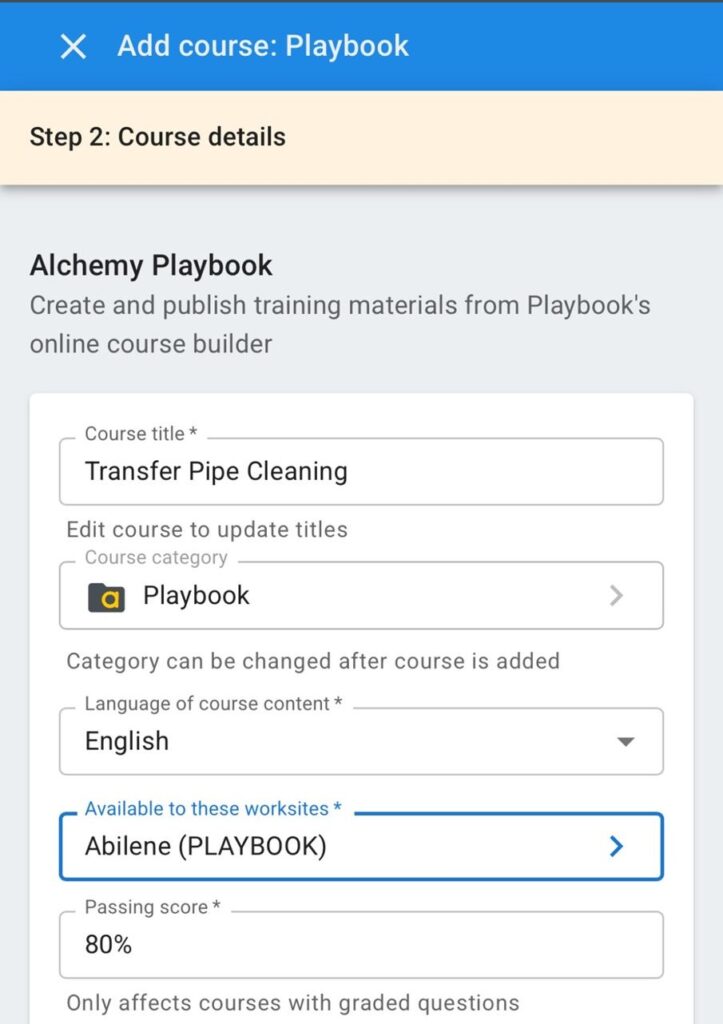
Previously, you would choose one or more worksites when you were publishing a course in Playbook. We’ve moved this decision and input point to the time when you’re first creating a draft course. In order for Playbook to load the worksites for you to choose from, you now must be connected to the internet when creating new courses; before, you could begin working on a course when you were offline. The input at the draft creation stage also has you choose the “Course category” now, and we’ve removed these two choices from the experience when you’re publishing a course.
Also new is a “Pending courses” page in Alchemy Manager, available in the menu on the left. This is where you’ll see these draft Playbook courses that are unpublished, and you will also access this new page within the app when you click “Load course.” This page gives you the standard filtering options you have on the “Courses” page today, which is a nice upgrade from the experience with your draft courses before.
Because you will only see Playbook draft courses for worksites you manage, your list of draft courses will now be much shorter and more relevant, which also makes it easier to sift through to find what you’re looking for. And because workers at other worksites will no longer see your draft courses, you can be more confident your work won’t be disrupted by other people you may not know.
Assigning Default Worksites
You and our other clients had thousands of draft Playbook courses we had to modify so the data would support this new workflow. Where we could, we assigned a default worksite by using the worksite of the author who originally created the draft Playbook course. We know this won’t always be the best choice. And, sometimes, the data for this default method was invalid; in these cases, we assigned the draft to the default Playbook worksite. No matter what worksite is shown for these pre-existing draft courses, you can easily edit the draft to select one or more valid worksites to replace what we inserted.
This Playbook change has obvious benefits now, and it also provides more possibilities for future feature enhancements. We encourage you to get a look at the worksite assignments we made and to make any needed changes soon to provide the access your people need.
We continue to work to make Playbook a better tool for your OJT. You can have input on what features we release in the future, and we’ll support you best when we hear from you. Please send your feedback and ideas to us at [email protected].

Comments